Enroll for Your Campus Field Clinic Day
Hillsborough Community College

Register for the July 10th, 11th or 13th On-campus Clinic Days
Herzing - Orlando

Register for the May 18th or 19th On-campus Clinic Days
Herzing - Tampa
Register for the May 20th or 21st On-campus Clinic Days
Saint Leo University

Spring Dates Coming Soon!
Southeastern College
Southeastern College

Spring Dates Coming Soon!
Follow these simple instructions, and you will be on your way to being clinical-ready.

1. Receive Enrollment Email: Check your school-issued email for your login details (username: your school email; temporary password provided). If you do not see it, look in your spam or junk folder.

2. Access Patient Portal: Click the link provided in the email to reach the login page.

3. Log In & Set New Password: Enter your username (school email), temporary password, and email address in the respective fields. Follow the prompt to create and confirm a new password. Do not change your username or email.

4. Navigate to Dashboard: You'll be directed to the Patient Portal Dashboard upon successful login.

5. Complete & Sign Forms: Proceed to the "Forms to Sign" section. Please create and save your signature by selecting "Signature." From the "Select Form" dropdown, please read, sign, and submit (using "SUBMIT COMPLETED") the HIPAA Disclosure, Vaccine History Authorization, and Medical History Report one at a time. Then, select "Exit to Dashboard."

6. Immunization Records: Upload your immunization history the Upload feature at the top of the page.
Via your immunization waiver, you can choose whether you want your immunization records pulled (depending on state residency) for a more thorough review.
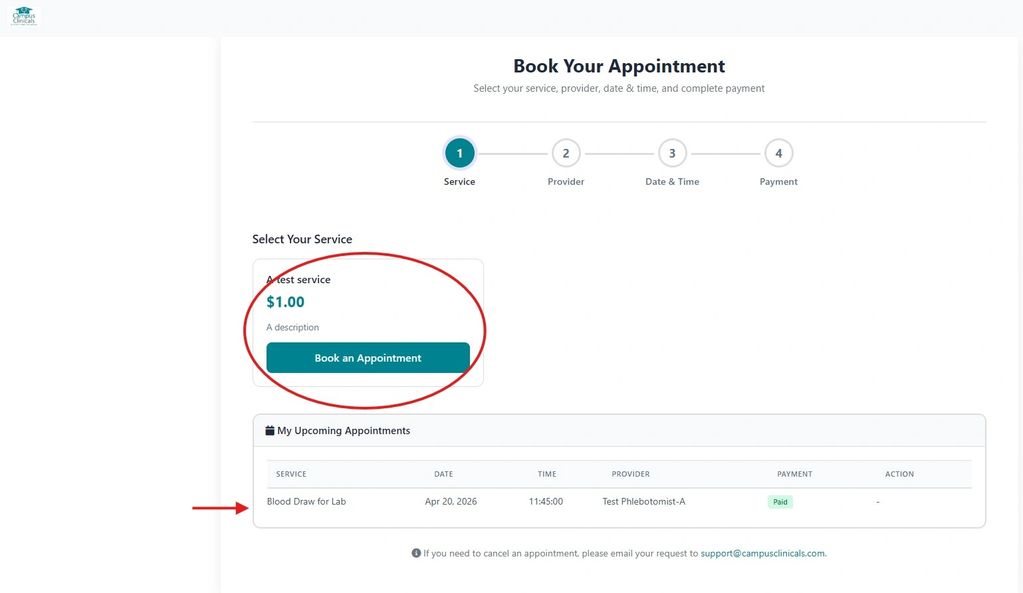
7. Schedule Appointment: Click "Appointments".

Choose your program's requirement package (e.g., blood draw, toxicology screening, physical exam).
Select a provider (draw station) and an available time slot.
Note, you may need to select multiple providers to select your preferred timeslot.
Proceed with "Continue to Payment" and complete the payment.

Confirm Appointment: Your scheduled appointment will appear on the screen. You'll receive a confirmation email from no-reply@campusclinicals.com to your school email for your records. If you need to change your appointment, please contact support@campusclinicals.com to request that change or cancellation.
